Odoo Customization Built Around Your Workflows
We extend Odoo’s standard apps with custom fields, views, workflows, reports and modules — so Odoo works the way your business runs, without blocking future upgrades.
For companies already running Odoo or mid-implementation, where standard features don’t cover a process that matters.
What we customize
- Fields, forms, list and search views
- Approval and business workflows
- QWeb PDF reports and dashboards
- Automated actions and scheduled jobs
- Access rights and record rules
- Extensions of Sales, Inventory, Accounting and more
Trusted by businesses in retail, textile, distribution, services and the public sector










Signs Your Odoo Needs Customization
Odoo covers most processes out of the box. These are the gaps we’re usually asked to close.
Standard features almost fit
The last part of the process still happens in spreadsheets, email or paper.
Approvals don’t match your hierarchy
Purchases, discounts or payments need sign-off that Odoo’s defaults can’t express.
Reports get rebuilt in Excel
Teams export data every week to produce the documents management actually reads.
Screens full of fields nobody uses
Users hunt through crowded forms and make entry mistakes.
Old customizations block upgrades
Past changes edited Odoo’s core, so every version upgrade becomes a rewrite.
Nobody can maintain the custom code
Undocumented modules from a previous partner make every change risky.
What Is Odoo Customization?
Customization sits between configuration (settings, no code) and custom development (entirely new applications). Most projects need a mix — we recommend the lightest option that solves the problem. Need a brand-new app or API? See Odoo development.
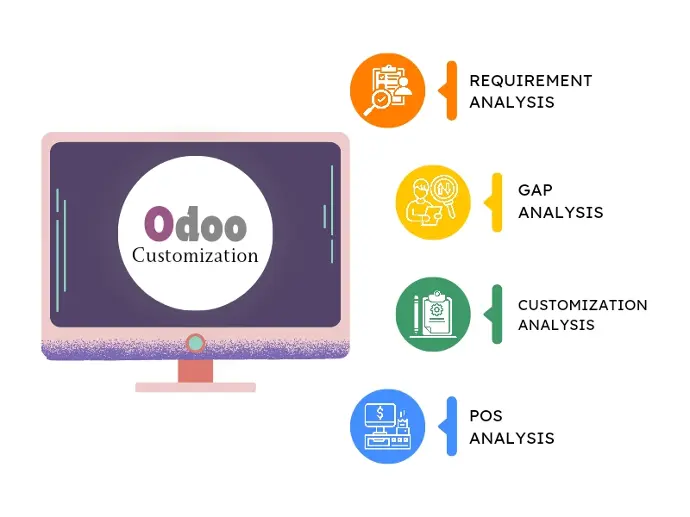
Four Analyses Behind Every Customization
Each request goes through the same analysis, so we only build what standard Odoo can’t already do — and build it in the lightest way.
- Requirement analysis — what the process really needs
- Gap analysis — what standard Odoo already covers
- Customization analysis — the lightest way to close each gap
- POS analysis — counter and store needs for retail businesses
Odoo Customization Capabilities
Six areas where targeted customization makes the biggest difference to daily work.
Fields, Forms & Views
- New fields and computed values
- Form, list, kanban and search views
- Smart buttons and conditional visibility
Business Workflows
- Multi-step approvals and states
- Validation rules and warnings
- Automated emails and activities
Reports & Dashboards
- QWeb PDF invoices, quotations, delivery slips
- XLSX exports and pivot reports
- Management dashboards
Automation
- Server actions and scheduled jobs
- Automated follow-ups and reminders
- Computed and related fields
Access & Security
- Security groups and ACLs
- Record rules per team or company
- Field-level visibility
App Extensions
- Sales, Purchase and Inventory logic
- Accounting and invoicing rules
- Manufacturing, POS and eCommerce behaviour
How Customization Translates Into Results
Every technical change we make is tied to a business outcome you can see.
Our Odoo Customization Process
Eight steps that keep changes small, tested and maintainable.
Requirement Workshop
We walk through the process that doesn’t fit today.
Why it matters: The real need is often different from the first request.
You get: Written user stories.
Fit-Gap & Options
Each gap is checked against configuration, Studio and code.
Why it matters: Avoids customizing what Odoo already does.
You get: A recommended option per gap.
Functional Specification
Screens, fields, rules and reports are agreed.
Why it matters: Removes guesswork before development.
You get: A signed-off specification.
Technical Design
Models, inheritance points and security are planned.
Why it matters: Protects your upgrade path.
You get: Design notes for each module.
Development
Separate modules built and code-reviewed.
Why it matters: Keeps each change isolated and reversible.
You get: Versioned modules.
Testing on Staging
Functional and regression tests on a copy of your data.
Why it matters: Catches side effects on standard flows.
You get: A tested build.
UAT & Deployment
You approve on staging; we deploy to production.
Why it matters: No surprises for users.
You get: Live customization.
Handover & Support
Documentation, user guidance and fixes.
Why it matters: Your team can rely on it long term.
You get: A maintainable module.
Customize Without Losing Your Upgrade Path
Poorly built customizations are the main reason Odoo upgrades become expensive. We build to avoid that.
Configure when…
- A setting or automated action solves it
- Odoo Studio can handle a simple field or view
- The process can adapt to standard Odoo
Customize when…
- The process is a real business difference
- Rules are too complex for Studio
- A report or document must follow a strict format
- Manual workarounds cost more than the build
Our coding standards
- Inherit — never edit Odoo core
- One purpose per module
- Odoo coding guidelines followed
- Code review before release
- Documentation for every module
Customizations We Build by Industry
Typical Odoo customizations for the industries we work with.
Manufacturing
Costing fields on BoMs, work-order data capture and quality checkpoints.
Retail & Fashion
Size and colour handling, store-level pricing and custom POS receipts.

Healthcare & Pharmacy
Batch and expiry rules, branch pricing and clinic-specific forms.
Textile
Fabric units, lot tracking and customized costing reports.
Distribution
Customer price lists, credit-limit approvals and delivery routes.

Education
Fee structures, admissions workflows and student records.
Construction
Job-costing fields and subcontractor approvals.

Hospitality
Folio reports, housekeeping status and front-desk views.
Odoo Customization in Real Projects
Projects where customization — or removing unnecessary customization — made the difference.
Mattson Group
- Challenge
- Heavily customized sales and rental workflows on Odoo 9 Community, plus a WooCommerce store that had to stay in sync.
- Solution
- Custom workflows realigned to standard Odoo 16 Enterprise features, with only the essential logic kept as custom modules.
- Scope & technology
- Workflow redesignSalesRentalWooCommerce
- Outcome
- Far less custom code to maintain on a modern Odoo version.
Koskii
- Challenge
- Separate tools for accounting, store sales and warehousing, with limited room for customization.
- Solution
- Odoo implemented with customization for costing, interoperability and reporting.
- Scope & technology
- CostingReportingAccountingInventory
- Outcome
- Core operations brought together on one customized Odoo platform.
Shree Mahadev Tex Fab
- Challenge
- The business had outgrown its Tally accounting setup.
- Solution
- Odoo implementation with customization of Odoo apps for their fabric business.
- Scope & technology
- CustomizationAccountingTextile
- Outcome
- Moved from Tally to a customized Odoo ERP.
Why Choose Us for Odoo Customization
What makes our customizations easier to live with.
How Much Does Odoo Customization Cost?
Customization is priced by scope, not by module count. The biggest drivers are the number of screens, rules and reports involved, and how much existing code must be reworked.
| Customization type | Typical scope | Main cost driver |
|---|---|---|
| Fields & views | New fields, layouts, filters | Number of screens affected |
| Reports | QWeb PDF, XLSX, dashboards | Layout and data complexity |
| Workflows | Approvals, states, notifications | Rules and exceptions |
| Automation | Server and scheduled actions | Volume and error handling |
| New module logic | Models and computations | Business rules and testing |
| Legacy rework | Refactoring old customizations | Code quality and version gap |
How Long Does Odoo Customization Take?
It depends on the size of each change. We break customization into small releases so your team sees progress early.
- Number of screens and fields
- Complexity of rules and approvals
- Report layouts and data sources
- Dependencies on other modules
- Data migration for new fields
- Testing and approval cycles
After the fit-gap step you get a release plan with the order and effort for each change.
What Our Odoo Clients Say
Real words from real clients.
I’ve tried many partners, but I feel trust and experience with only the MP Technolabs team.
I appreciate working with the team — they delivered the project successfully.
I’ve never seen responsiveness like the MP Technolabs team provides — 24/7 support, they’re always there.
Odoo Customization FAQs
Answers to the questions teams ask before customizing Odoo.
What is the difference between Odoo configuration, customization and development?
Configuration changes settings without code. Customization extends standard Odoo apps with new fields, views, rules, reports and logic in separate modules. Development builds entirely new applications, portals or APIs.
Will customizations break when we upgrade Odoo?
Not if they are built properly. We use inheritance instead of editing core code and keep each change in its own module, so it can be reviewed and migrated during an upgrade. Customizations that edited core code usually need refactoring first.
Can you customize both Odoo Community and Enterprise?
Yes. We customize both editions. Some standard features, such as Studio, exist only in Enterprise, which affects the best way to meet a requirement.
Can Odoo Online (SaaS) be customized?
Only partly. Odoo Online supports Studio-level changes but not custom Python modules. Deeper customization usually needs Odoo.sh or a self-hosted server.
Should we use Odoo Studio or custom code?
Studio suits simple fields, views and automations. Custom modules are better for complex logic, strict report layouts, version control and predictable upgrades.
Can you change standard modules like Sales, Inventory or Accounting?
Yes. We extend their models, views and business logic through inheritance, so the standard module stays intact.
Can you create custom approval workflows?
Yes. We build multi-level approvals based on amount, product, team or company, with notifications and audit history.
Can you build custom PDF reports and invoices?
Yes. We design QWeb PDF documents — invoices, quotations, delivery slips and certificates — plus XLSX exports and dashboards.
Can you fix customizations built by another partner?
Yes. We start with a code audit, then fix, refactor or rebuild modules depending on their quality and your upgrade plans. For ongoing work, you can also hire a dedicated Odoo developer.
How do you test customizations?
Every change is tested on a staging copy of your database, including regression checks on the standard flows it touches, before you approve it for production.
Which Odoo versions do you customize?
We have worked with Odoo versions from V8 to V20. For new work we recommend a currently supported version.
How much does Odoo customization cost?
It depends on the screens, rules, reports and existing code involved. Request an estimate and we’ll price it after a short fit-gap review.
Make Odoo Work the Way Your Business Works
Tell us which process doesn’t fit today. We’ll recommend whether to configure, customize or develop — and what it will take.