AI & OCR Document Automation

AI & OCR Solutions for Odoo and Your ERP

Turn invoices, purchase orders, sales orders, receipts and delivery notes into validated ERP records — with AI-powered OCR that reads the document, checks the data and posts it into Odoo or your existing system.

For finance, procurement and sales teams still keying documents by hand, and businesses that want document automation built into their ERP instead of another standalone tool.

PDF, JPG and PNG documents · Odoo-native or API integration

What the automation does

  • Reads documents in many layouts
  • Extracts header and line-item data
  • Validates against ERP master data
  • Flags low-confidence fields for review
  • Creates draft records in the ERP
  • Keeps the original file attached
Humans stay in control. Nothing is posted without the validation rules and review steps you choose.
13+Years of company experience
V8–V20Odoo version expertise
200+Odoo projects delivered
PDF · JPG · PNGDocument formats

Trusted by businesses in retail, textile, distribution, services and the public sector


GulfTill Tools GmbHGWSSBOrderOutUrbanLens88ABXOlivio&CoScience City GujaratSeven DimensionSpin11
The Manual Document Problem

Why Manual Document Entry Holds Teams Back

Every document typed into the ERP by hand costs time and invites mistakes. These are the problems we’re asked to remove.

Hours of manual data entry

Staff re-type vendor invoices and orders line by line.

With AI & OCR: Fields and line items captured automatically.

Typing errors reach the books

Wrong amounts, tax or quantities are found late.

With AI & OCR: Validation rules check totals, tax and master data.

Every vendor uses a different layout

Templates break whenever a supplier changes its format.

With AI & OCR: AI reads layouts without a fixed template per vendor.

Slow approvals and month-end

Documents wait in inboxes before anyone enters them.

With AI & OCR: Documents enter the workflow as soon as they arrive.

No audit trail

It’s hard to trace a record back to the source document.

With AI & OCR: The original file stays attached to the ERP record.

Lost or late expense receipts

Receipts are misplaced, miscategorised or submitted late.

With AI & OCR: Upload from mobile or web and categorise automatically.
The Basics

What Is AI OCR Document Processing?

AI OCR (also called intelligent document processing) combines optical character recognition with AI models that understand the document: it finds the vendor, dates, totals, tax and line items, checks them against your ERP data, and turns them into structured records — instead of just producing text.

Traditional OCR only converts an image to text. AI OCR adds field understanding, validation and ERP integration, which is what removes manual entry. For Odoo users it works alongside the accounting, purchase, sales and expense apps — see our Odoo customization and development services.

Capture
EmailUploadScanMobile
Understand
OCRField extractionLine items
Validate
Totals & taxMaster dataDuplicates
Post
Draft ERP recordApprovalAttachment
Solutions

AI & OCR Solutions We Build

Each solution targets one document flow and ends in your ERP, not in a spreadsheet.

AI Invoice Processing

  • Vendor, dates, totals and tax captured
  • Multi-format: PDF, JPG, PNG
  • Draft vendor bills in Odoo or your ERP

Sales Order Recognition

  • Orders from email, scans or PDFs
  • Customer, items and quantities detected
  • Order validation before creation

Purchase Order Automation

  • PO number and vendor recognition
  • Approval workflow routing
  • Matching with bills and receipts

Expense Receipt Recognition

  • Receipt upload from mobile or web
  • Automatic categorisation
  • Policy checks before approval

Delivery Notes & Custom Documents

  • Delivery notes and packing slips
  • Your own business forms
  • Fields defined for your process

ERP Integration

  • Native Odoo modules
  • API integration with other ERPs
  • Accounting system sync

Validation & Review

  • Confidence thresholds per field
  • Human review queue
  • Duplicate detection

Reporting & Monitoring

  • Documents processed and pending
  • Exceptions and corrections
  • Audit trail back to the file
Intelligent Document Processing

From Inbox to ERP Record in One Flow

Documents arrive by email, upload or scan. The AI engine extracts the data, the validation layer checks it against your ERP, and only clean records flow through — exceptions go to a person with the source file side by side.

  • Capture from shared mailboxes, upload or scanners
  • Header and line-item extraction
  • Checks against vendors, products, tax and POs
  • Review screen for exceptions
  • Draft or posted records, as you decide
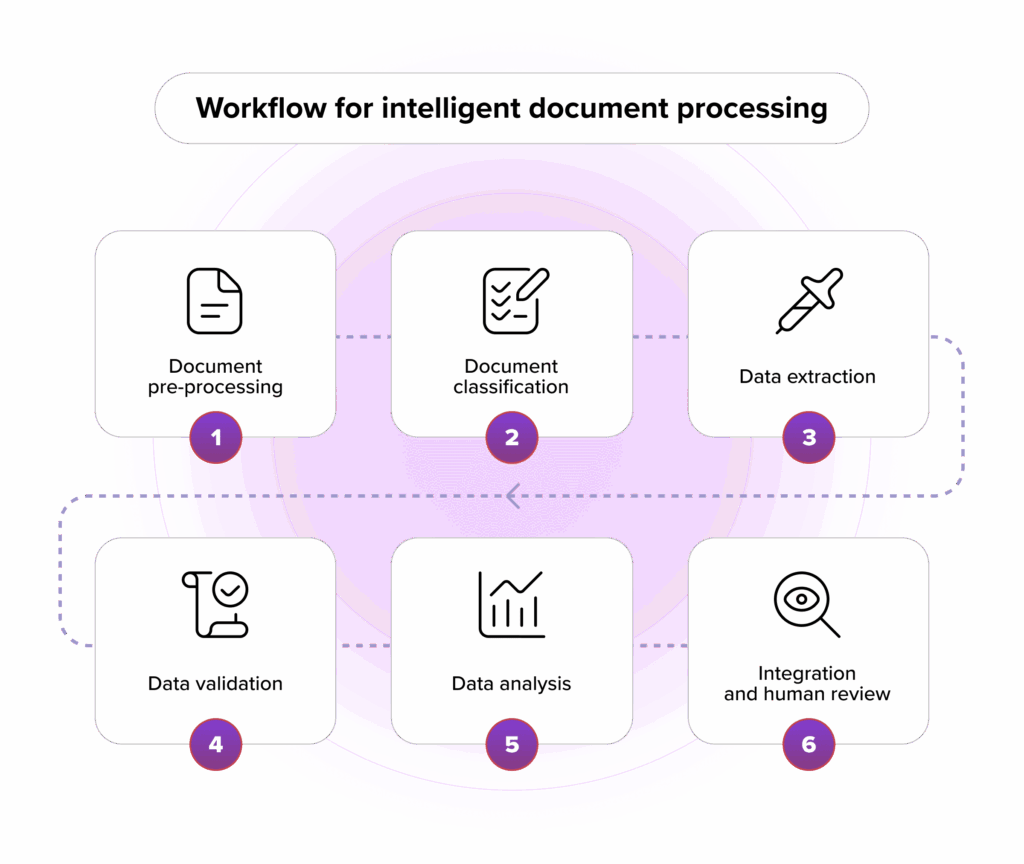
Workflow for intelligent document processing into an ERP
Document Types

Which Documents Can Be Automated?

Each document type gets its own fields, rules and ERP destination.

DocumentWhat is extractedWhere it goes
Vendor invoicesVendor, number, dates, tax, totals, linesVendor bills
Sales ordersCustomer, items, quantities, prices, deliveryQuotations / sales orders
Purchase ordersPO number, vendor, items, termsPurchase orders & matching
Expense receiptsMerchant, date, amount, tax, categoryExpense reports
Delivery notesReference, items, quantitiesReceipts & deliveries
Custom formsFields you defineThe model you choose
Our Process

How We Deliver AI & OCR Automation

Start small with real documents, prove the results, then scale.

1

Document Assessment

We review sample documents, volumes and the target ERP process.

Why it matters: Sets realistic expectations.

You get: A scope and document list.

2

Field & Rule Design

Fields, validation rules and review steps agreed.

Why it matters: The output matches how you work.

You get: A field and rule specification.

3

Pilot on Your Documents

Extraction tested on your own samples.

Why it matters: Accuracy is measured, not promised.

You get: A pilot result report.

4

ERP Integration

Records created in Odoo or your ERP via module or API.

Why it matters: No re-typing between systems.

You get: A working integration.

5

User Acceptance

Your team processes real documents with review.

Why it matters: Confidence before go-live.

You get: Signed-off workflow.

6

Go-Live & Improvement

Monitoring, exception review and rule tuning.

Why it matters: Results improve with use.

You get: An improvement backlog.

Have sample documents?

Send a few and we’ll show you what can be automated.

Book an AI & OCR Demo
Technology

The Technology Behind Our Document Automation

We choose the OCR and AI components per project, based on your documents, languages, volumes and hosting needs.

AI & OCR

Reading and understanding documents.

OCR enginesAI field extractionLine-item parsingConfidence scoring

Integration

Getting data into your ERP.

Odoo modulesREST / JSON APIsXML-RPCEmail ingestionWebhooks

Platform

Where the solution runs.

PythonPostgreSQLOdoo.shDockerCloud or on-premise
Odoo V8–V20 — document automation built into the Odoo version you run
Manual vs Automated

Manual Entry vs AI & OCR Automation

What changes when documents stop being typed by hand.

Today

Manual entry

  • Documents re-typed line by line
  • Errors found late
  • Work piles up at month-end
  • Source file stored separately
Basic

Template OCR

  • Text extracted, not understood
  • A template per vendor layout
  • Little validation
  • Manual copy into the ERP
Recommended

AI OCR + ERP integration

  • Fields and line items understood
  • Works across layouts
  • Checked against ERP data
  • Records created in the ERP
  • File attached for audit
Business Visibility

See the Impact on Your Document Workflow

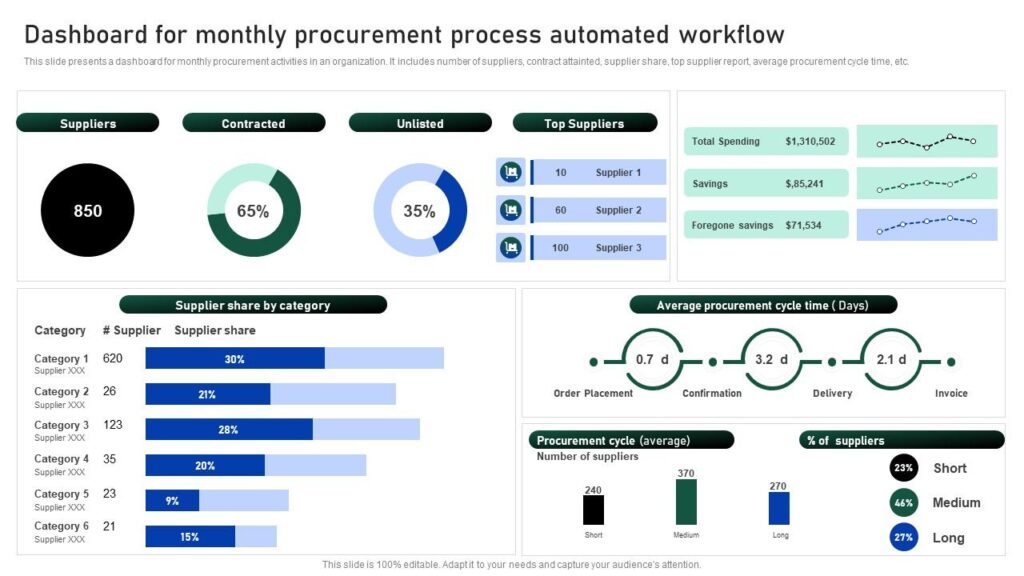
Automation is only useful if you can see it working. We set up views that show what was processed, what needs review and where exceptions come from, so rules keep improving.

  • Processed vs pending documents
  • Exceptions by vendor or field
  • Time from receipt to ERP record
  • Corrections feeding rule improvements
Dashboard showing the impact of procurement document automation
Related Projects

ERP Projects That Show Our Integration Depth

Document automation is only as good as the ERP behind it. These case studies show the Odoo platforms our team builds and integrates.

Pharmacy retail

Dawatech

Saudi Arabia, Jordan & Egypt · Odoo 16
Challenge
Branches handled pricing, refunds and cashier sessions differently across three countries.
Solution
One bilingual Odoo 16 platform with POS, B2B ordering and a consumer app.
Scope & technology
POSMulti-countryEN / AR
Outcome
Live in three countries on one platform.
Read the case study →
Container sales & rental

Mattson Group

Hamburg, Germany · Odoo 9 → 16
Challenge
A heavily customized Odoo 9 system with a WooCommerce store to keep in sync.
Solution
Migration to Odoo 16 Enterprise with integrations realigned to standard features.
Scope & technology
IntegrationMigrationWooCommerce
Outcome
A modern platform with far less custom code to maintain.
Read the case study →
Why MP Technolabs

Why Choose MP Technolabs for AI & OCR Solutions?

Document AI built by an ERP team, so the data lands where it belongs.

13+ years in businessA company track record in ERP projects.
V8–V20 expertiseAutomation for the Odoo version you run.
ERP-first designRecords created in the ERP, not exported to spreadsheets.
Validation built inRules and review steps before anything is posted.
Custom developmentFields, rules and screens built for your process.
Pilot before scaleResults measured on your own documents.
Beyond OdooAPI integration with other ERPs and accounting tools.
Functional + technicalFinance process and code handled by one team.
Cost

How Much Does AI & OCR Automation Cost?

Pricing depends on the documents and the integration, so we estimate after reviewing samples.

FactorWhy it matters
Document typesEach type needs its own fields and rules
VolumeProcessing and review workload
Layout varietyNumber of vendors and formats
LanguagesOCR and extraction setup
ERP integrationOdoo module or external API
HostingCloud or on-premise deployment
Accuracy

How Accurate Is AI OCR?

Accuracy depends on document quality, layout consistency and language, so we don’t quote a single number. Instead we:

  • Measure extraction on your own sample documents
  • Set confidence thresholds per field
  • Route uncertain fields to human review
  • Validate against ERP master data
  • Tune rules from corrections after go-live

You see real results in the pilot before committing to a full rollout.

Client Feedback

What Our Odoo Clients Say

Real words from real clients.

I’ve tried many partners, but I feel trust and experience with only the MP Technolabs team.
M
MohamadSeven Dimension, Kuwait
I appreciate working with the team — they delivered the project successfully.
S
Sonu TekwaniShree Mahadev Tex Fab Pvt Ltd
I’ve never seen responsiveness like the MP Technolabs team provides — 24/7 support, they’re always there.
UL88 logo
Dhiraj GuptaUL88
FAQ

AI & OCR Solutions FAQs

What businesses ask before automating document entry.

What is AI OCR?

AI OCR combines optical character recognition with AI models that understand a document’s fields and line items, so the data can be validated and posted into an ERP instead of just converted to text.

Which documents can you automate?

Vendor invoices, sales orders, purchase orders, expense receipts, delivery notes and custom business documents with fields you define.

Which file formats are supported?

PDF, JPG and PNG, whether received by email, uploaded or scanned.

Can it integrate with Odoo?

Yes. We build Odoo modules that create draft vendor bills, sales orders, purchase orders or expenses, with the original file attached.

Can it integrate with ERPs other than Odoo?

Yes. We integrate through APIs with other ERP and accounting systems such as SAP, Tally, QuickBooks or custom platforms, depending on what the system exposes.

How accurate is the extraction?

It depends on document quality, layout and language. We measure accuracy on your own samples in a pilot and add validation rules and human review for low-confidence fields.

Do we need a template for every vendor?

No. AI extraction reads fields across different layouts. Rules can still be added for vendors with unusual documents.

Can it read line items, not just totals?

Yes. Line items such as products, quantities, prices and tax can be extracted and matched to your products and accounts.

What happens when the AI is unsure?

Fields below the confidence threshold go to a review screen, where a user checks them against the source document before the record is created.

Can it match invoices with purchase orders?

Yes. Extracted invoices can be matched against purchase orders and receipts so differences are flagged before payment.

Can employees submit receipts from their phones?

Yes. Receipts can be uploaded from mobile or web, then extracted, categorised and checked against expense policy.

Which Odoo versions do you support?

We have worked with Odoo versions from V8 to V20, and design the automation for the version you run.

Where is our data processed?

Deployment is agreed per project — in the cloud or on your own servers — and access follows your ERP user rights.

How long does implementation take?

It depends on the number of document types, layouts and integrations. We give a timeline after the document assessment and pilot.

How much does AI OCR automation cost?

It depends on document types, volumes, layout variety, languages, integration and hosting. Request an estimate.

Automate Document Entry

Ready to Stop Typing Documents Into Your ERP?

Send us a few sample documents and tell us where the data should go. We’ll show you what can be automated and how.